


Someone in HR has just built an entire onboarding process using Claude.
It collects information, decides what happens next, drafts emails, coordinates tasks and responds to questions.
Pretty impressive, considering they might have needed a developer to build something similar a couple of years ago.
And they're not alone. HR professionals are experimenting with Claude, Copilot, ChatGPT and other AI tools, finding ways to automate processes they've been wrestling with for years.
It's opening up some genuinely exciting possibilities.
But once the initial excitement wears off, there are a few less glamorous questions worth asking.
How much does it cost to run? What happens when 1,000 employees use it? Who's responsible when something goes wrong? And does anyone actually know what information is being shared with AI along the way?
Because building a clever AI workflow is one thing.
Running it reliably across an organisation is quite another.
During a recent 50skills webinar, Jessie Schofer from Stakkd raised an interesting point about the way organisations are approaching AI automation.
Speaking about conversations with HR professionals experimenting with tools such as Claude, she said:
"Most of the time what you need is an automation and one of the steps in that automation needs to have some AI."
It's a simple observation, but an important one.
We've become so focused on what AI can do that we sometimes forget to ask whether it's the best way to do it.
Take employee onboarding.
An AI agent could decide when to send a welcome email, whether IT needs notifying, which manager should approve an equipment request and when to remind someone about an outstanding form.
But why does AI need to make those decisions?
If a new employee joins the marketing department, you already know which equipment they need. If a form hasn't been completed after three days, you already know a reminder should go out.
These are established rules. They don't require interpretation or creative thinking.
And they certainly don't need an AI model reconsidering the same decision every time a new employee joins.
That's what standard automation is good at.
AI becomes useful when something genuinely needs interpreting, such as checking whether an uploaded document contains the required information or understanding a free-text employee request.
The trick is knowing the difference.
Let's say you've built an employee request workflow using AI.
An employee submits a request. AI reads it, determines what type of request it is, decides who should handle it, drafts a response and sends the appropriate notifications.
It works beautifully during testing.
Then you roll it out to 2,000 employees.
Suddenly, the economics look rather different.
Many AI services consume tokens each time a model processes or generates information. Depending on your setup, you might pay for that usage directly, through API charges, or encounter usage limits and other costs through a subscription.
And if you're using AI to make decisions at every stage, you're potentially consuming resources for tasks that could have been handled by simple rules.
Jessie raised exactly this issue during the webinar, pointing out that organisations are introducing automation to save money, yet can end up running entire workflows through AI tools that consume tokens at every stage.
Consider a hypothetical workflow that runs 10,000 times.
If it calls an AI model five times per run, that's 50,000 AI calls.
If you use AI only for the one step that requires interpretation, that's 10,000 calls.
Same number of requests. Potentially the same business outcome. Far fewer AI interactions.
That doesn't automatically mean an 80% reduction in cost. Token consumption, model choice, software subscriptions and other infrastructure costs all affect the calculation.
But it raises an obvious question.
Why are we paying AI to make decisions we've already made?
And cost is only half the problem.
Here's another scenario.
Someone in HR builds a recruitment assistant using their preferred AI tool.
Someone else creates a process for handling employee relations questions.
A third person uses an AI agent to review information submitted during onboarding.
All three are trying to solve genuine problems. All three might have built something useful.
But what happens when these experiments become part of everyday operations?
Does anyone have a complete picture of which AI workflows are being used?
Who owns them? Which versions are running? What employee information is being shared? What instructions are being given to the models? And can someone investigate what happened if an output is questioned?
Depending on the tools, account settings and integrations involved, those answers might be easy to find. Or they might be scattered across individual accounts, chat histories and separate systems.
For HR, that's a serious consideration.
We're dealing with personal information, confidential documents and processes that can affect people's employment.
It's not enough for an AI workflow to produce a useful answer. Organisations also need appropriate controls over the information it accesses, the actions it can take and the records it leaves behind.
And that's where the design of the workflow becomes particularly important.
Rather than giving an AI agent responsibility for an entire process, consider giving it one clearly defined job within a structured workflow.
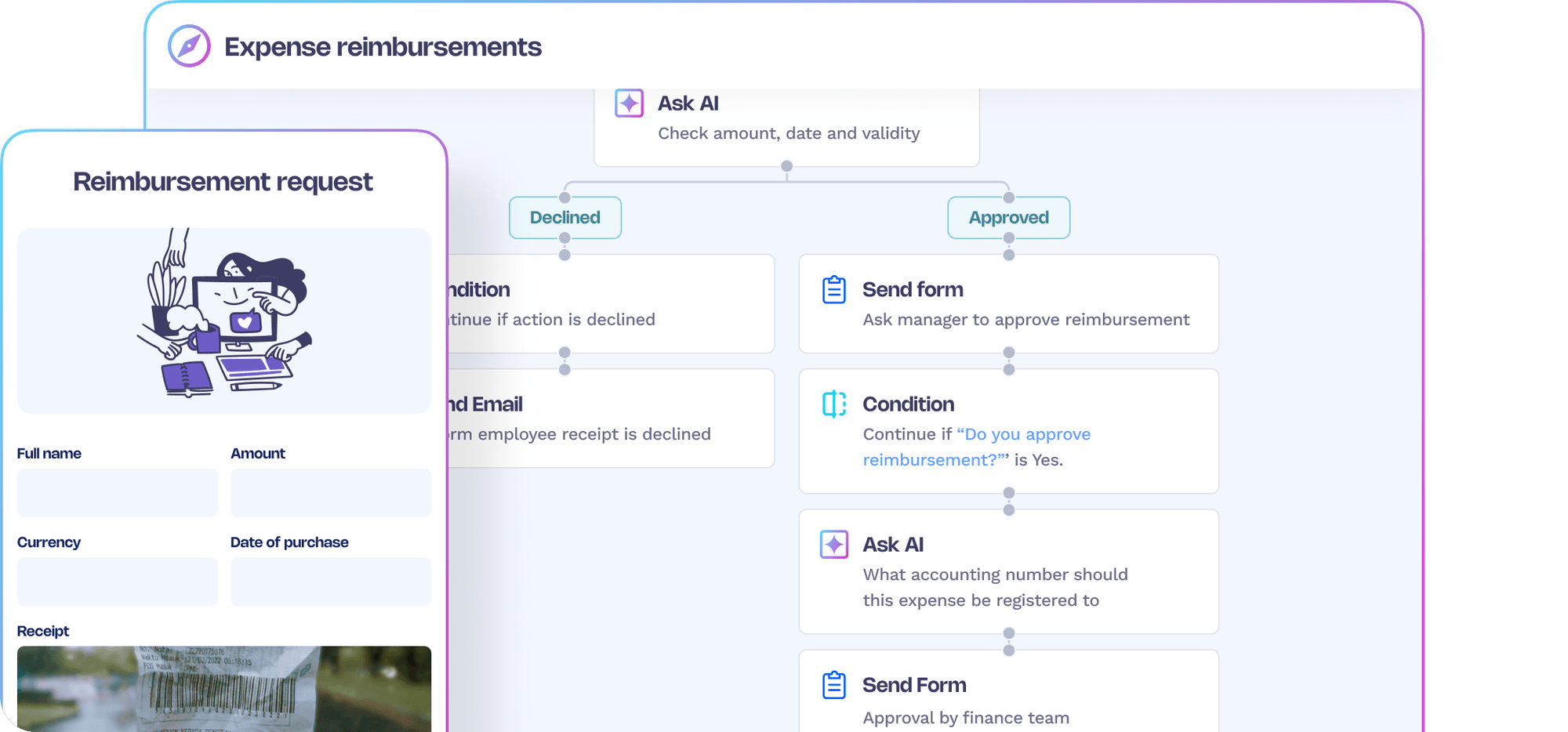
Take an employee wellbeing reimbursement.
The employee submits a claim and uploads a receipt.
An AI step checks the document, extracts relevant information and identifies whether it appears to meet the requirements.
That's useful. Receipts arrive in different formats, and interpreting their contents is exactly the sort of task AI can help with.
But the surrounding process doesn't need to be left to AI.
Standard automation can collect the application, route exceptions for human review, update the relevant systems and notify the employee of the outcome.
And because the AI action is a defined step, the organisation can establish controls around it.
In 50skills, for example, AI steps can be configured with specific instructions, and their execution can be recorded, including the prompt, output and timing. The wider workflow also provides visibility into completed actions and process history.
That means you're better placed to answer questions such as:
Of course, putting AI inside a workflow doesn't automatically make it compliant or eliminate the risks associated with sensitive data. Permissions, data handling, retention policies and appropriate human oversight still matter.
But a structured process gives you somewhere to apply those controls, rather than relying on everyone to manage them independently.
One of the most interesting parts of our webinar discussion wasn't actually about technology.
It was about ownership.
Jessie described how teams can enthusiastically experiment with their own automations, only to run into questions about how those processes should work consistently across the business.
Who decides what the standard process should be? Who's responsible for maintaining it? What happens when different teams create different versions?
These questions existed long before AI.
Anyone who's worked in HR across multiple departments, countries or locations will recognise the problem.
One office has its own onboarding checklist. Another has a slightly different approval process. Someone has built an elaborate spreadsheet that nobody else understands.
AI can make it much easier to create new processes. But without some coordination, it can also make it easier to create more variations of the same problem.
As Jessie discussed, organisations still need to agree how their processes should operate and establish common standards.
AI can help build those processes, but it can't decide what your organisation's policies and standards ought to be.
That responsibility still belongs to people.
And once a workflow is running, someone needs to own it.
If a policy changes, who updates the process?
If an AI step starts producing unexpected results, who investigates?
If someone leaves the business, who takes responsibility for the automation they created?
These aren't particularly exciting questions when you're experimenting with a new AI tool.
They're rather important when the business starts depending on it.
There's a reason we're interested in combining AI with deterministic workflows at 50skills.
AI is incredibly useful for helping people build automations. You can describe the process you want, and AI can turn that description into a structured workflow.
But once it's built, you can choose which steps need AI and which should simply follow established rules.
That gives HR teams the flexibility to use AI for tasks involving interpretation, while keeping predictable actions consistent.
It also means you can manage processes within a shared environment, with defined ownership, workflow history and visibility into individual AI actions.
That's a different proposition from allowing every step of a process to be decided dynamically by an AI agent.
And it isn't an argument against autonomous agents.
There are situations where an agent's ability to reason, choose tools and adapt to unpredictable circumstances is genuinely valuable.
But if the process is already well understood, and the next step is determined by a clear business rule, that flexibility might not be buying you very much.
It could simply be making an otherwise straightforward process more expensive and complicated.
Jessie made another useful observation towards the end of the webinar.
AI can get you much of the way towards a working first version remarkably quickly. But the final part still needs human judgement.
You need to check whether the workflow does what the business actually requires, whether the steps make sense and whether AI is being used in the right places.
That's an important skill for HR teams to develop.
Before building your next AI workflow, ask yourself:
Could a standard rule handle this step? If the outcome is predictable, there's probably no reason to involve an AI model every time.
What happens when we scale it? Consider the costs, usage limits and maintenance involved when hundreds or thousands of people rely on the process.
Can we see what the AI is doing? Think about prompts, data access, outputs, approvals and the ability to investigate individual actions.
Who owns the process? Make sure there's someone responsible for keeping it accurate, secure and up to date.
Does AI actually improve the outcome? Flexibility is useful when you need it. Otherwise, consistency might be more valuable.
The opportunity for HR isn't simply to build more AI agents.
It's to build better processes, using AI where it makes a meaningful difference.
Because the smartest workflow isn't necessarily the one using the most AI.
And your finance team might appreciate that distinction too.
AI has made it easier than ever for HR teams to build their own automations. That's something worth celebrating.
But as those experiments become part of everyday operations, the questions change. It's no longer enough to ask whether something works. We also need to consider what it costs to run, how reliably it performs and whether we have proper visibility into what's happening.
Sometimes AI is exactly what a process needs. Sometimes a simple automated rule will do the job perfectly well.
And often, the best answer is a combination of both.
At 50skills, that's how we approach HR automation. AI helps you build workflows and handles the steps that benefit from interpretation, while standard automation keeps the rest of the process moving consistently, with visibility and control over what happens along the way.
Because the goal isn't to build the most impressive AI agent.
It's to build a process that actually works for your organisation.
Want to see what that looks like in practice? See how 50skills works.
Thanks to Jessie Schofer, founder of Stakkd, for sharing her insights during our recent webinar. Jessie helps HR and TA teams discover, evaluate and make sense of new technology, including AI. Check out Stakkd for practical HR tech insights and tools worth exploring.